It is 6 PM on a weekday and you have decided to send 5,000 rupees to a friend. You pick up the phone, open your UPI app, and then you freeze. Your friend asked for "your IFSC code" and you cannot remember it. You dig out your passbook, find the branch name easily, but the code is nowhere on it. Twenty minutes pass, you call three different people, and you finally learn something that surprises you: the IFSC is not printed in your passbook at all.
This is the story of almost every person who has ever sent money to someone else's bank account. And it happens for one simple reason: we all know how to use an IFSC code, but nobody ever explains what it actually means, how it is built, or how to get the right one quickly. Search "how to find IFSC code" on Google and the top results are the same four or five websites that put one big search box in front of you and then send you off to your own bank's website. There you pick a district, scroll through a long list, and after three or four clicks the code finally appears. But nobody explains the part that is supposed to take two or three days of your life.
That is why we built an IFSC Code Finder — a free tool that does two useful things. First, if you already have an IFSC code, paste it in and the tool pulls out the complete branch record: bank name, branch name, full address, city, district, state, MICR code, and which transfer facilities (UPI, IMPS, NEFT, RTGS) are available there. Second, if you need to find an IFSC code, you pick your bank and then narrow down step by step — state, district, branch — until the exact branch you want appears, with its code, name, city and district right next to it. No app to download, no sign-up, no redirect. Just the answer.
But before you use the tool, and before you trust any IFSC code with real money, you need to understand IFSC rather than merely remember it. A wrong IFSC can take three to five working days to return your money, and the mistake is common enough that thousands of people lose money to it every month. This guide covers all of it: what an IFSC code is, why its structure looks the way it does, where it came from, how to find one by hand without any tool, the mistakes people make, and how it is actually used in real life. This guide follows the latest 2026 rules, so read it once properly — in ten minutes every piece of banking confusion you have will be gone.
What Is an IFSC Code? — A Simple Definition and a Deeper Explanation
IFSC stands for Indian Financial System Code. It is an 11-character unique code that the Reserve Bank of India (RBI) assigns to every bank branch in the country. Each branch has its own IFSC — whether it belongs to SBI, HDFC, or a small cooperative bank in a remote village.
Now let us be clear about what this code actually does. When you send money to someone using NEFT or RTGS, your bank has to be told which branch the money should land in. That is exactly what an IFSC code does. Think of it as a postal address for money: your account number tells the bank who the money is for, and the IFSC code tells it where it goes. Without an IFSC code, a bank transfer is simply not possible, because the bank has no delivery address to use.
One critical point: an IFSC is a branch code, not a bank code. Two different branches of the same bank will have two different IFSC codes. If you use the IFSC of the Andheri branch of SBI in Delhi while sending money to a branch in Mumbai, the money will land at the wrong branch and bounce back. That is why you must always use the IFSC of your current branch, never someone else's.
The RBI introduced this system in 2009 so that transfers between small and large banks would follow one single standard. Before that, every bank had its own system — SBI had one, PNB had another — and moving money from one bank to another was genuinely difficult. The IFSC code collapsed all of that complexity into one 11-character string.
| Item | Detail | Why It Matters |
|---|---|---|
| Full form | Indian Financial System Code | The official RBI system |
| Length | 11 characters | 4 letters + 1 zero + 6 characters |
| Unique level | Per branch | Every branch has its own code |
| Issued by | Reserve Bank of India | Tamper-proof and standardised |
| Used for | NEFT, RTGS, IMPS, salary, EMI | Bank-to-bank transfers |
| Not used for | UPI, ATM cards, cheque clearing | UPI needs a VPA, cheques need MICR |
Understanding the IFSC Code Structure — The Secret Behind Those 11 Characters
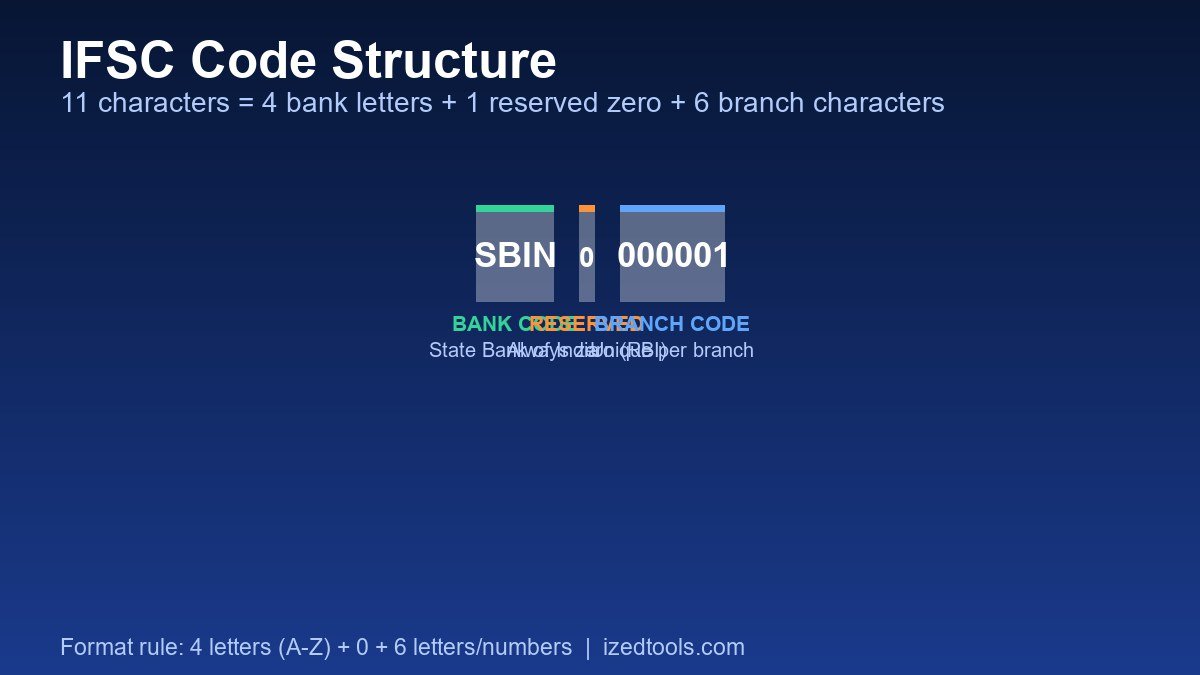
An IFSC code is not a random string. Its structure is fixed, and every part does a specific job. Once you understand this, you can identify the bank from any IFSC code without using a single tool. That single skill will save you time in every banking transaction you ever do.
The first 4 characters — the bank code. These four letters identify the bank. This is the exact code the RBI assigned to that bank. SBIN is State Bank of India, HDFC is HDFC Bank, ICIC is ICICI Bank, PUNB is Punjab National Bank, UTIB is Axis Bank, BARB is Bank of Baroda, CNRB is Canara Bank, UBIN is Union Bank of India. You will constantly hear people say "my SBI code is SBIN" — those are the same four letters that begin their IFSC code.
The 5th character — always zero. This position is reserved. The RBI has never used it and does not use it today. This tiny detail is extremely useful: if your "IFSC" is 11 characters long and the 5th position is not a zero, then that code was never valid. The same logic applies to the first four characters — they must always be letters (A–Z). If they are numbers, something has gone badly wrong.
The last 6 characters — the branch code. These six characters identify that specific branch. They can be a mix of letters and numbers. For example, the main branch of SBI carries the code 000001 (the parent of all 20,000-plus SBI branches), while other branches have different codes such as 002345 — and sometimes mixed alphanumeric codes like 0MTW also appear.
Let us take a real example: SBIN0000001. Its first 4 characters SBIN identify State Bank of India. The 5th character 0 is reserved. The last 6 characters 000001 identify SBI's main or head office branch. And in SBIN0023456 the bank is still SBIN, but the branch is completely different.
| Position | Example | Characters | Meaning |
|---|---|---|---|
| 1–4 | SBIN | 4 letters | The bank code — State Bank of India |
| 5 | 0 | 1 digit | Reserved position — always zero |
| 6–11 | 000001 | 6 letters or numbers | The unique branch code |
One more important detail — an IFSC code contains no spaces and no dashes. Eleven characters, nothing else. If someone gives you SBIN 0000001 or SBIN-0000001, it has been typed or copied incorrectly and the transfer will fail. A lot of people copy the code from a PDF and a stray space comes along for the ride. Always clean the code before using it.
IFSC vs MICR Code — What Is the Difference?
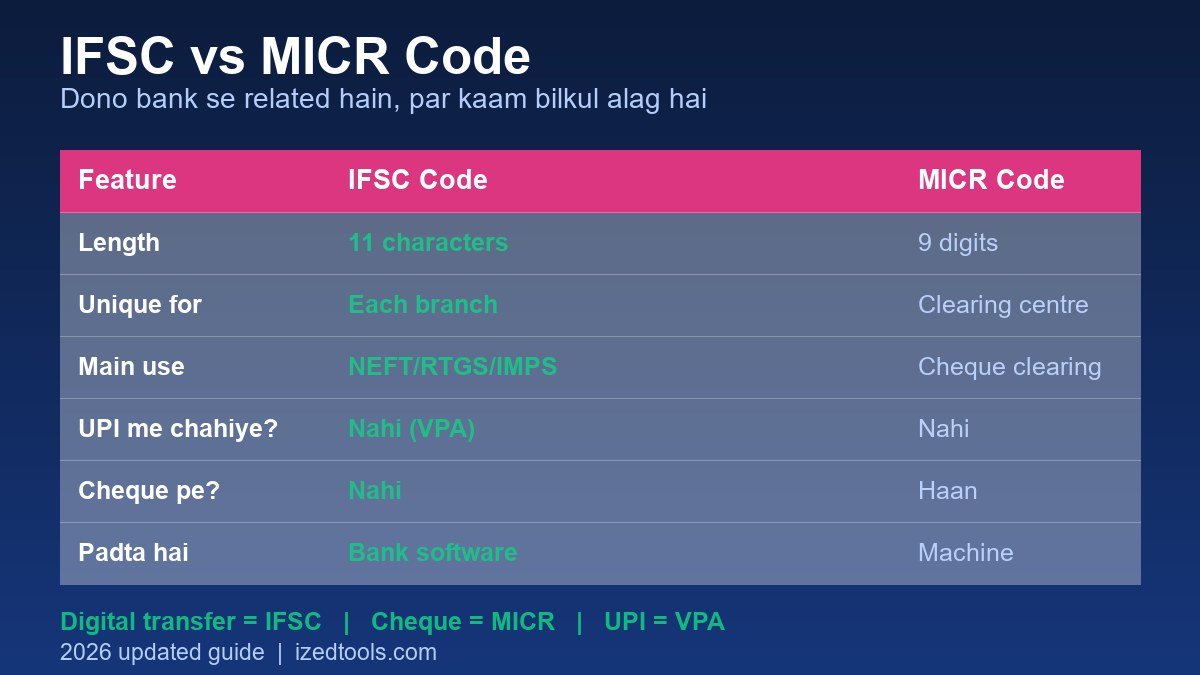
This is the single most repeated piece of confusion in Indian banking. IFSC and MICR are both bank-related codes, both appear on passbooks and forms — but they do completely different jobs. Mix them up and either your transfer fails or your cheque bounces.
MICR stands for Magnetic Ink Character Recognition Code. It is 9 digits long and it has exactly one purpose: cheque clearing. When you fill out a cheque and deposit it at a bank, the MICR code is read by a machine and the cheque is routed to the correct clearing centre. That is all. MICR has nothing to do with transfers.
IFSC is used only for digital transfers — NEFT, RTGS and IMPS. Whenever you send money through a bank, or someone sends money into your account (salary, EMI, a refund), the IFSC code is what gets used.
| Feature | IFSC Code | MICR Code |
|---|---|---|
| Length | 11 characters | 9 digits |
| Unique for | Every branch separately | Shared by a clearing centre |
| Main use | NEFT / RTGS / IMPS / salary / EMI | Cheque clearing only |
| Who reads it | Bank software (also typed by hand) | A machine (magnetic reader) |
| Needed for UPI? | No — a VPA is needed | No |
| Needed on a cheque? | No | Yes |
| Found in a passbook? | Sometimes (on the branch details page) | On the first page of the passbook |
Here is a practical scenario. Rahul needed to send 20,000 rupees to his son. He added a beneficiary in his banking app. The bank asked for an "IFSC code" — and Rahul, confused, opened his passbook, copied the MICR code, and entered it. The result: the transfer failed, and Rahul did not even realise it for two days. This happens with thousands of people every year.
A second scenario: Suresh needed the MICR code to fill out a cheque and accidentally wrote down his IFSC instead. The bank returned the cheque, and Suresh had to visit the branch again.
Here is the shortcut worth memorising: digital transfer = IFSC, cheque = MICR, UPI and PhonePe = VPA. That is all you need to remember, and confusion becomes impossible.
The History of IFSC and the Role of the RBI
Banking has existed in India since 1947, but digital transfers arrived very late. Until the 1990s, if you wanted to send money to a bank account in another state, you physically posted a cheque, and "clearing" took five to seven days. In some cases the cheque bounced, and getting the money back could take yet another week.
After 2000, NEFT (National Electronic Funds Transfer) arrived and transfers that used to take two or three days were finished in two hours. But there was one enormous problem: every bank had its own "bank code" system. SBI had one, HDFC had another, PNB had another. Banks would ask you for "your bank code", and most people had no idea what it was. Even when opening a new account, staff had to type the code into their system by hand, which caused repeated errors and failed transfers.
In 2009 the RBI launched the IFSC system. The formula was deliberately simple — one national-level 11-character code that would be unique for every bank branch. Suddenly any branch of any bank could send money to any branch of any other bank, just by knowing that branch's IFSC. RTGS (for transactions of two lakh rupees and above) finally got a standard too, and later UPI (2016) made digital payments even easier — but UPI still runs on the very same IFSC infrastructure underneath.
Now an important clarification: IFSC and UPI are different things, but they are bolted to the same system. Because UPI exists, many people assume IFSC codes are now obsolete. They are not. The moment you want to make a large RTGS transfer, or someone wants to send money directly into your bank account without going through UPI, they will need your IFSC. And if you are sending money to someone who wants to add you as a beneficiary in their own bank, IFSC is what they will need as well.
One more thing most people do not know — in some banks an IFSC can be longer than 11 characters. The current RBI standard is 11 characters, but some cooperative banks and payment banks use codes of 12 or 14 characters. So do not impose a hard 11-character limit when copying an IFSC. Copy whatever code you were given, in full.
How to Find an IFSC Code Without a Tool — The Manual Methods
First, it is worth understanding that the manual route still exists. It is simply more work. Knowing it matters because sometimes the network is down, or you are in a place where you do not have data. Let us start with the most common and most reliable methods.
Method 1 — Your bank's official website or mobile app
This is the most authoritative method, because the data comes straight from the bank itself. Every large bank (SBI, HDFC, ICICI, PNB, Axis, Kotak) has an "IFSC Code Finder" or "Branch Locator" section on its website. There you have to pick three things: State, District, and Branch. Once you search, you get a list where every branch has its name, address and IFSC code.
The biggest advantage of this method is that the code you get is only ever your own branch, because you are selecting your own city and district. That removes any chance of copying the code of the wrong branch. The limitation is that bank websites are often slow, and loading that much data on a phone can easily take two to three minutes.
Method 2 — The net banking dashboard
If net banking is active on your account, the "Beneficiary Management" or "Account Details" section will usually show your own IFSC code. It makes sense that the bank has it: it needs the code for your salary credits, your EMIs and your KYC updates. Going into net banking and reading off your account number and IFSC is the safest method of all, because that is unambiguously your own account.
The same information exists in mobile banking apps — you just need to find the "Account Details", "My Profile" or "Account Info" section. For SBI it appears in the profile section of the SBI inTouch app. For HDFC, look under "My Profile". Every app has a different menu, but the concept is identical.
Method 3 — The passbook and account statement
The IFSC is not printed in the passbook every time, but some banks do print "Branch IFSC" or "Branch Code" on the first page of the passbook. If it is not there, check your account statement (PDF) — many banks print both the IFSC and the MICR in the footer of the statement. It is a little tedious, but it works.
The most important rule: if you are giving your account number and IFSC to somebody, give only the IFSC and the name — never the account number. If an account number and an IFSC ever end up in the wrong hands, the damage can be serious. An IFSC on its own is far less risky, because it cannot be used to deposit money into someone's account; it only reveals where money can be sent.
Method 4 — Identify the bank from the first 4 characters (the offline trick)
This is the fastest trick when you do not need the full record and only want the bank name. The first 4 characters of an IFSC code are the bank code. Some codes are worth remembering:
| IFSC Start | Bank | IFSC Start | Bank |
|---|---|---|---|
SBIN | State Bank of India | PUNB | Punjab National Bank |
HDFC | HDFC Bank | BARB | Bank of Baroda |
ICIC | ICICI Bank | CNRB | Canara Bank |
UTIB | Axis Bank | UBIN | Union Bank of India |
KKBK | Kotak Mahindra Bank | YESB | Yes Bank |
IDIB | Indian Bank | BOI | Bank of India |
CIUB | Central Bank of India | PNB | Punjab & Sind Bank |
KKBK | Kotak Mahindra Bank | SIBN | South Indian Bank |
HVBL | HDFC Bank (old) | DBSS | DBS Bank |
NUBL | NuBank (Nxtra) | PYTN | Paytm Payments Bank |
This table gives you one more advantage: you can instantly verify a claim. If somebody says their bank is SBI and their code starts with SBIN0123456, that is genuinely SBI. If somebody says they have an HDFC account but their IFSC is ICIC0001234, you should think twice.
In 2026 you no longer need to memorise this table — in our IFSC Code Finder the bank name appears live as soon as you start typing the code. But the table is still useful, because bank websites do not offer a "type the code and see the bank" option.
Step-by-Step Guide — Finding a Code With the IFSC Code Finder
Now for the practical part. Our free IFSC Code Finder has three modes, and each one suits a different situation. Let us walk through all three.
Mode 1 — When you already have an IFSC code (pull out the details)
- Open the tool. Go to the IFSC Code Finder — nothing to download, nothing to log into.
- Stay on the "Look Up by IFSC" tab. This is the default tab.
- Type or paste the code. Enter the 11 characters in the box. Spaces and dashes are stripped automatically, and lowercase letters are corrected for you.
- Watch the instant feedback. As soon as you finish 11 characters, a message appears telling you whether the format is valid — along with the bank name. If the 5th character is not a zero, the warning appears immediately. You never have to wait on a network call to find out that a code is malformed.
- Press "Get Details". The complete record appears within about a second.
- Read or copy the details. You get the bank name, branch name, full address, city, district, state, MICR code, and the availability of UPI/IMPS/NEFT/RTGS at that branch. The "Copy Details" button puts all of it on your clipboard in one click.
Mode 2 — When you need to find an IFSC code (cascading bank, state, district, branch)
This is the mode that replaces hunting through long lists. Instead of searching a keyword and hoping the right branch appears, you narrow down the bank step by step, and each dropdown only fills in after you have made the choice above it.
- Switch to the "Search by Bank" tab.
- Choose your bank. The dropdown contains more than 1,500 Indian banks — SBI, HDFC, ICICI, PNB, Axis, Kotak, Yes Bank, plus local banks from every state. Both the bank code and the name are shown (for example "KKBK — Kotak Mahindra Bank"), so finding your bank is easy.
- Choose the state. The moment you pick a bank, the state dropdown loads every state in which that bank operates. For Kotak Mahindra Bank you will get 29 states; for State Bank of India you will get all 35. Nothing else on the page is clickable yet, so you cannot accidentally skip a step.
- Choose the district. The district dropdown now fills with every district that bank operates in for the state you chose. Choosing Uttar Pradesh for Kotak, for example, brings up 59 districts.
- Choose the branch. The branch dropdown fills with every branch of that bank in that district — Kotak Mahindra Bank has 14 branches in Kanpur, for instance. Each option shows the branch name and the IFSC code together.
- Select a branch to see full details. Pick the branch you want and a complete branch card appears: bank, branch name, full address, city, district, state, MICR code, and the UPI/IMPS/NEFT/RTGS badges.
- Copy the code. The "Copy IFSC" button copies the selected code to your clipboard in one click, and "Clear" resets the whole cascade back to the beginning.
One thing worth knowing: the very first time you select a bank, that bank's full branch list is downloaded and cached on the server, which can take ten to fifteen seconds for the largest banks such as SBI or HDFC. Every search for that same bank afterwards is instant, because the data is already cached. You only ever wait once per bank.
Another important point — a matching city does not mean you have matched the right branch. ICICI alone has more than a hundred branches in Mumbai. Always match the branch name as well, against your passbook or your ATM slip. Simply copying the first result that matches your city is the single most common mistake people make here.
Mode 3 — Quick search by bank and city
Sometimes you do not want to step through four dropdowns; you just want to type "kanpur" and see everything. That is what Quick Search is for. Choose a bank, type a city, district or branch name into the box, and press "Search Branches". You get a table of matching branches with the IFSC, branch name, city, state and UPI status for each one, plus a copy button on every row.
Use Mode 2 when you know your bank and want certainty. Use Mode 3 when you are in a hurry and just want to scan a list. Use Mode 1 when you already have a code and want to confirm what it actually points to.
7 Common Mistakes People Make With IFSC Codes
Mistake 1 — Entering an account number where the IFSC should go
The most common mistake of all. An account number is 12 to 18 digits long; an IFSC is 11 characters. You paste a number, assume it worked, and the bank rejects it immediately. If your "IFSC" is 12 digits or more, it is an account number, not an IFSC code.
Mistake 2 — Not removing spaces and dashes
Many people copy the IFSC from a PDF and pick up a space, producing SBIN 0000001 or SBIN-0000001. The bank's system expects exactly 11 characters. Our tool strips spaces automatically, but if you are copying the code somewhere else — WhatsApp, a form — check it yourself.
Mistake 3 — Picking a branch just because the city matched
A single city can have anywhere from 20 to 100 branches of the same bank. If you searched "Mumbai" and copied the first result, there is a 90% chance you have the wrong branch. Make this mistake and the money goes to the wrong branch and comes back — costing you three to five working days.
Mistake 4 — Using an outdated IFSC after a branch merger
Banks merge branches constantly, with smaller branches being folded into larger ones. Old IFSC codes may be closed or redirected. That is why you should verify the code once before any large transfer (one lakh and above), and make it a habit to check weekly even for smaller amounts.
Mistake 5 — Looking for an IFSC when you actually need a VPA
Plenty of people assume the IFSC is "digital payment". It is not. UPI needs a VPA (something like name@bank), not an IFSC. If somebody asks for "my UPI ID", send the VPA. You need an IFSC only when you are making a direct NEFT or RTGS bank transfer.
Mistake 6 — Mixing up MICR and IFSC
Filling out a cheque needs the 9-digit MICR code, not the 11-character IFSC. Writing an IFSC on a cheque gets the cheque returned by the bank. Remember the split: MICR for cheques, IFSC for digital transfers.
Mistake 7 — Giving away your account number together with the IFSC
This is the most serious mistake of all. If you hand somebody both your account number and your IFSC, and they mistakenly send the wrong amount, your options for getting it back become extremely limited. Share only the IFSC and the name, and keep the account number private. If somebody asks you for just the IFSC, that genuinely means they need the IFSC and not your account number.
Real-Life Case Studies — Three Mistakes and Three Fixes
Case 1 — Rahul: 5,000 Rupees Delayed by Six Days (the MICR mistake)
Rahul added his colleague Vishal as a beneficiary in his banking app to send 5,000 rupees. The bank asked for an "IFSC code", and Rahul opened his passbook and entered the first 9-digit number he saw, assuming it was the MICR. The transfer sat in "pending" for six days. Only when Vishal asked where the money was did Rahul realise he had entered a MICR code instead of an IFSC.
The fix: when adding a beneficiary, always enter the 11-character code. If you are unsure, look at the first 4 characters and check that they match the bank's name. In Rahul's case, the first 4 characters of that MICR number did not match any bank.
Case 2 — Priya: A 2 Lakh Transfer Failed (wrong branch)
Priya decided to send 2 lakh rupees from her HDFC Bank Andheri branch to her son's account. She copied an IFSC from a friend — but it was her friend's Mumbai suburban branch. The transfer was submitted, and three days later the bank returned it with the message "beneficiary details mismatch". Getting the money back took another four days.
The fix: your IFSC must always be that of your current branch, never anybody else's. If you have changed branches — you moved banks, or you shifted house — get your new IFSC. Priya still cannot recall ever having had the code for her own branch.
Case 3 — Amit: Twenty Minutes Wasted Every Single Month
Amit paid his rent every month, and every single month it took him twenty to thirty minutes to find his IFSC. Then one day he searched Google, tried a tool, and bookmarked it. His rent payment now takes thirty seconds. It is a tiny thing, but it saves him an hour every month.
The fix: save your IFSC in one place — your phone's notes app, or a password-protected note. Look it up once, store it, and never hunt for it again. Just make sure you do not write down the account number alongside it; keep the IFSC and the bank name only.
Our IFSC Code Finder Compared to Other Methods
We have now looked at five methods: the bank's website, net banking, the passbook, other websites on Google, and our tool. Let us put them side by side and see which is best for which situation.
| Feature | iZedTools IFSC Finder | Bank's Website | Other Tools / Apps |
|---|---|---|---|
| Full details from an IFSC | Bank, branch, address, city, district, state, MICR + UPI/IMPS/NEFT/RTGS status | Mostly just the IFSC code | Bank, branch, address (MICR often missing) |
| Finding by bank and place | 1,500+ banks with cascading bank → state → district → branch | State → District → Branch (3 dropdowns) | Bank + State + District (limited) |
| Speed | 1 second (first bank 10–15s, then instant) | 20–60 seconds (heavy site) | 5–15 seconds |
| Format validation | Instant — 11 characters, 5th character zero, live bank name | None — you just fill the form | Sometimes |
| App download | No — runs in the browser | No (though the app is better) | Many force an app download |
| Sign-up / Login | Never | Sometimes | Sometimes |
| MICR + facilities | Both — MICR and UPI/IMPS/NEFT/RTGS | Mostly no MICR | MICR only, or nothing |
| Cost | Free, no limits | Free | Some free, some "premium" |
| Data freshness | Branch list cached and refreshed (30 days) | Always the latest | Often badly out of date |
| Ad spam / redirects | None | None | Many run 3–4 redirects mid-way |
The table makes one thing clear: the bank's website is authoritative, because it always shows the most current data, and nobody can argue with that. But that three-dropdown, sixty-second experience is painfully slow on a small screen. And the "other tools" usually involve three or four redirects, sometimes wrong data, and pop-up ads along the way.
Our tool sits in the middle. It is not as fast as a bank's own website, but it behaves like a conversation: you type into one box and the answer appears. And it returns the things other websites will not give you — the MICR code, the UPI/IMPS/NEFT/RTGS status, and live format validation.
So our honest recommendation is this: use our tool for everyday lookups, and verify once on the bank's official website before any large transaction (over one lakh). Running both together makes the chance of an error practically zero.
What Other Tools Are in Your Toolkit
Once the banking side is sorted, more tasks usually follow: working out a loan EMI, calculating tax, or creating a document. These tools take care of all of that for you:
- EMI Calculator — check the monthly EMI, total interest and the full amortisation schedule before you take a loan. It shows the exact EMI your bank will deduct.
- In-Hand Salary Calculator — work out your real take-home pay from your CTC. A great many people find it genuinely surprising how little actually reaches their hands each month.
- Income Tax Calculator — find out straight away which regime suits you better, the new one or the old one.
- PPF Calculator — plan a 15-year long-term saving schedule at the current 7.1% rate.
- GST Calculator — split an invoice into CGST, SGST and IGST correctly.
- QR Code Generator — create a UPI QR code and get paid by scan, without asking the customer for any amount.
You can browse all of these on our Calculators and Banking Tools category pages.
Frequently Asked Questions — Everything About IFSC Codes
Q1. What is an IFSC code and how does it work?
IFSC stands for Indian Financial System Code. It is an 11-character unique code that the RBI assigns to every bank branch. It tells the banking system where money will land when you send it. Every branch has its own IFSC, and it is what NEFT, RTGS and IMPS transfers rely on. The first 4 characters are the bank code, the 5th character is always a zero, and the remaining 6 characters identify the branch.
Q2. How do I find an IFSC code — what is the easiest way?
The easiest way is to use the "IFSC finder" section of your bank's website or app, where you pick State, District and Branch and the code appears. An even better way is our IFSC Code Finder tool: type the code and you get the complete branch record immediately, or use the cascading bank, state, district and branch dropdowns to find the exact branch you need. No app download and no sign-up required.
Q3. Is the IFSC code of SBI always SBIN?
Yes — every IFSC code of State Bank of India begins with SBIN, such as SBIN0000001 for the main branch or SBIN0023456 for a specific branch. Every large bank has its own 4-letter code — HDFC, ICIC, PUNB, UTIB, KKBK, BARB — so the first 4 characters alone identify the bank.
Q4. What is the difference between an IFSC code and a MICR code?
An IFSC code is 11 characters long and is used only for digital bank transfers (NEFT, RTGS, IMPS, salary and EMI credits). A MICR code is 9 digits long and is used only for cheque clearing. The two jobs are completely different — online transfers need an IFSC, filling out a cheque needs a MICR. Mixing them up causes failed transfers and returned cheques.
Q5. Is any 11-character code a valid IFSC?
No. There are three format rules: the code must be exactly 11 characters, the 5th character must always be 0, and the first 4 characters must be letters (A–Z). But a correct format does not mean the branch actually exists, so it should still be verified against the database. Our tool performs both checks separately and tells you whether the problem is the format or the branch.
Q6. Do I need an IFSC code for UPI?
No. UPI does not require an IFSC code. UPI, Google Pay, PhonePe and Paytm all run on a VPA — something like name@bank. You need an IFSC only when you are making a direct bank-to-bank transfer over NEFT or RTGS, or when somebody wants to send money straight into your bank account.
Q7. How can I get the full address of a branch from an IFSC code?
Enter the code in our tool and you get the bank name, branch name, full address, city, district, state and MICR code all at once, along with whether UPI, IMPS, NEFT and RTGS are available at that branch. The data comes from bank records, so it saves you time filling out forms.
Q8. Does an IFSC code change when branches are merged?
Sometimes. When two branches are merged, the combined branch may get a new IFSC, and the old code may be closed. That is why you should verify the IFSC before large transfers, and make it a habit to check once a week even for smaller amounts, because money sent to a wrong branch takes three to five working days to come back.
Q9. Is it safe to share an IFSC code?
Sharing an IFSC code on its own is comparatively safe — it cannot be used to deposit money into someone's account, and it only reveals where money can be sent. But you should never share your account number. Giving an account number and an IFSC together is risky. If somebody asks you only for the IFSC, they genuinely need the IFSC and not your account number.
Q10. Is every bank IFSC exactly 11 characters?
The current RBI standard is 11 characters — 4 letters, 1 zero and 6 characters. However, some cooperative banks and some payment banks use codes of 12 characters or more. So do not truncate the code when copying it — copy whatever you were given in full, and verify the branch if it matters.
Q11. If I enter a wrong IFSC, how do I get the money back?
Most banks do not reject a wrong IFSC instantly — the transfer simply goes into "pending" and the money returns within three to five working days, sometimes with a charge. This is why it is worth sending a small test transfer (say 100 rupees) first to confirm the code, and only then sending the larger amount. A great many people avoid the problem entirely with that one test transfer.
Q12. Is my data safe when I use this tool?
Yes. Whatever IFSC code or city name you type is never stored or logged. The request goes straight to public bank records and is displayed in your browser. Branch lists are cached on the server so that repeat lookups are fast, but your account number, personal details and documents are never stored or shared. No sign-up, no app download.
Q13. How can I identify a bank from the first 4 characters of an IFSC?
That is exactly how IFSC codes were designed — the first 4 characters are the reserved bank code. For example SBIN is State Bank of India, HDFC is HDFC Bank, ICIC is ICICI Bank, PUNB is Punjab National Bank and UTIB is Axis Bank. Our tool shows the bank name live as you type, so you never have to memorise these.
Q14. Where is the IFSC code written when I open a new account?
When you open an account at a bank, the bank fills the IFSC into the form itself — you do not have to do anything. You only need to note down the account number and the IFSC. The account number appears on your passbook and welcome letter, and the IFSC appears on that same letter or in your net banking profile.
Conclusion — Stop Worrying About IFSC Codes Today
Let us collect the most important points of this 2026 guide in one place:
One. An IFSC code is 11 characters — 4 letters for the bank, 1 zero, and 6 characters for the branch. Understand this and you can identify the bank in any IFSC code instantly.
Two. IFSC is for digital transfers, MICR is for cheques, and VPA is for UPI. They are three different things, and they should never be mixed up.
Three. Your IFSC must always be that of your current branch, never anybody else's. This is the single biggest cause of failed transfers.
Four. Send a 100-rupee test transfer before any large one. It saves five minutes and can save lakhs.
Five. Save your IFSC in one safe place — but never share your account number.
You now have everything you need. A free tool that runs entirely in your browser — IFSC Code Finder — that pulls the complete branch record from an IFSC code, or finds your branch's code through simple cascading bank, state, district and branch dropdowns. No login, no app, no limits.
Give it a try once. The moment you see that finding an IFSC takes ten seconds, you will not go back to the old way. And when somebody asks you how to find an IFSC code, you can teach them this exact method — because now you genuinely understand it.